Cloudfare Domain Management
Our domain (gradientmetrics.com) is hosted and managed on a platform called
Cloudfare.
You can use this platform to buy new domains or add subdomains to our already purchased domains. Generally, we won’t be buying new domains too often, but we are adding subdomains quite frequently.
In the Domain Name System (DNS) hierarchy, a subdomain is a domain that is a part of another (main) domain. For example, if a domain offered an online store as part of their website example.com, it might use the subdomain shop.example.com. See below for a few of our already existing subdomain examples:
- handbook.gradientmetrics.com -> The subdomain for this website
- docs.gradientmetrics.com -> The subdomain where we host coding documentation
- email.gradientmetrics.com -> A redirect to Campaign Monitor, our email marketing platform
- roadmap.gradientmetrics.com -> The subdomain where our Trendlines subscribers can see and add to our roadmap
- r.gradientmetrics.com -> The subdomain that hosts our RStudio Workbench platform
As you can see, there are many use cases for subdomains. In the future, we want to start providing client dashboards, which will likely mean that they will get their own subdomains (e.g., czi.gradientmetrics.com). Or, even better, a global clients.gradientmetrics.com website where they can subsequently login to their own portal.
Adding or removing subdomains can be done from the DNS registration. There are two ways to add a subdomain.
A TypeRecordCNAMERecord
Most of the times, you’ll be adding a subdomain based on the suggestions of a different website (that’s providing the content). E.g., on HubSpot or Softr.io.
Let’s run you through this using an actual example. For our roadmap.gradientmetrics.com subdomain, Softr requested us to create a new A type subdomain as instructed below:
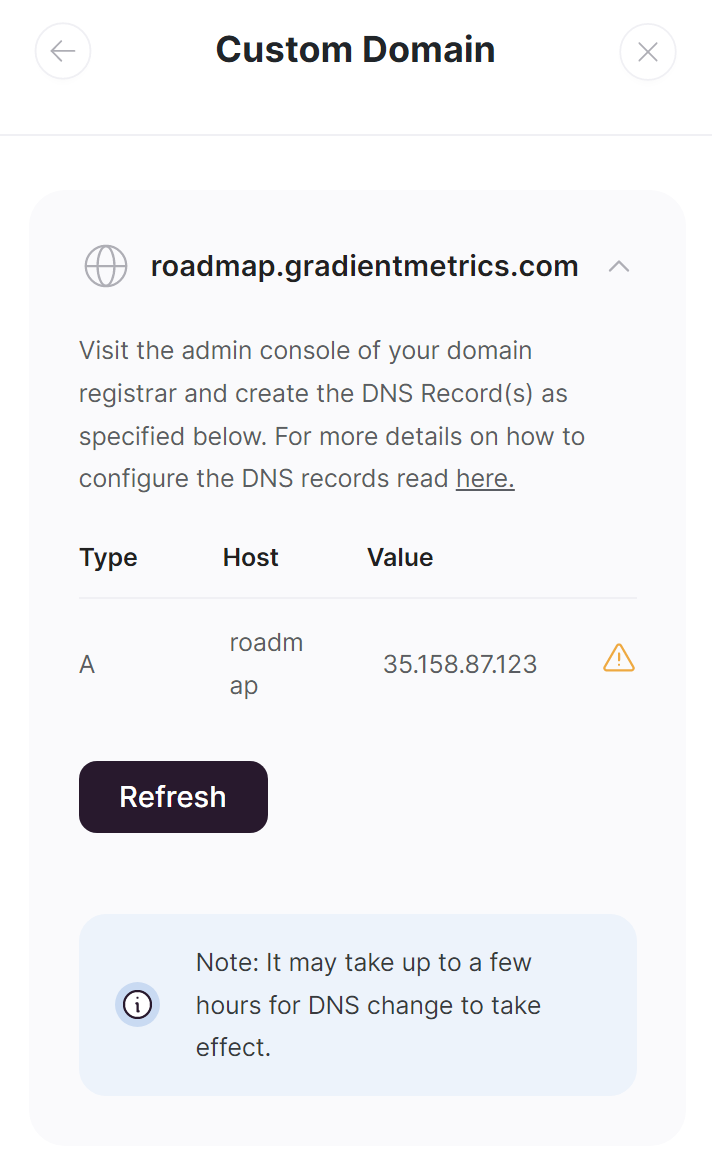
Navigate to the
DNS registration page and simply press Add Record and fill in the details according to the instructions. When it’s ready, it should look like this

Note that it can take up to a few hours for the DNS to register, so testing your subdomain may not instantly work.
In other, more common instances, the website requires you to add a CNAME record. The process is the same, but this time you select the CNAME type instead of the A type. The difference here is that it doesn’t point to an IP Address but to another targeted website.
Take for instance this Handbook. It’s hosted on a website app called Netlify, and we need to tell the DNS that, instead of their subdomain, it should be pointing at a subdomain that we requested. See here for the example:
