Fielding the Survey with Dynata
Step-by-step instructions for launching the survey through the Dynata API can be found here.
This step comes right after programming the survey and is part of the first phase of the newsletter cycle, which usually begins during the last week of the month. During an ideal fielding week, the timeline is as follows (we will be covering the bolded portions in this section):
- Monday: Confirm topics and start developing survey instrument
- Tuesday: Finish survey instrument and begin programming
- Wednesday: Finish programming and launch data collection
- Thursday: Begin analysis of initial data
- Friday: Finish analysis script
Once you receive an email notification that the survey has been launched, you can set up the #dynata-survey-status Slack channel to monitor the survey progress and automatically close out the survey once the target N has been reached.
To do this, first start the “FREE | dynata monitoring progress” EC2 instance. On lines 19-20 in the dynata.R file, edit the information to include the Qualtrics survey ID and Dynata project ID you set up during the initial launch. On line 21, indicate the minimum number of seconds one should need to take on the survey without being counted as a rusher. In this case, that value is set to 3*60 (3 minutes).
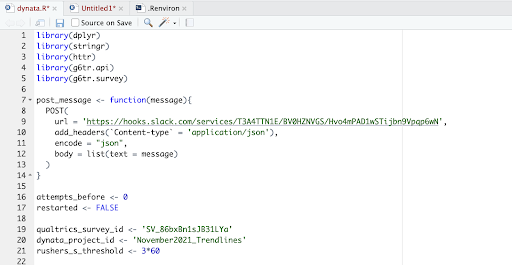
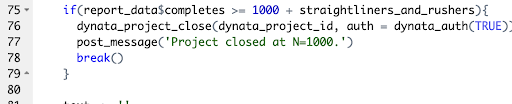
Lastly, in this file, you will want to make sure that the values on lines 23, 75, and 77 are equal to the total target N for the survey, which for Trendlines is 1,000.

To access a web dashboard to continue monitoring the launch and make changes, navigate to https://samplify.dynata.com/ and use the following login information:
Username: trendlines-production@gradientmetrics.com
Password: Dynata[API]-user1298