Github Builds
Before pushing package updates to github you should always run R CMD check to
make sure that you did not break any CRAN standards and that all the tests
continue to run well. But still, to be on the safe side, we run R CMD checks
in an automated way using
github actions.
Generally speaking, GH Actions is a service on GitHub which allows you to run automated tasks in isolated containers. These tasks can be really whatever you want, but the main use case is of course testing and building software in your repository.
To elaborate more on what “automated” means: in particular you can set up actions to be run
- on a schedule (e.g. once a week)
- on specific events, most often on pull requests
- whenever you manually request it through GitHub’s web UI.
At Gradient, our primary environment for R development is RStudio Workbench on an Ubuntu server. Consequently, we have concentrated our testing efforts on a single setup that represents the Workbench environment.
If you open
.github/workflows
folder in our repository, you’ll see multiple yaml files named as
{package-name}-check-ubuntu.yaml. These are the files that define GitHub
Actions that test our packages.
In line with our git workflow, we utilize a single main branch, master. While
working on a package update, developers first create a draft PR to master,
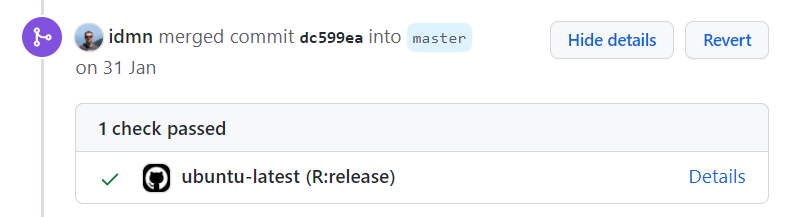
which does not initiate check actions. By clicking the “Ready for review”
button, the developer indicates that the PR is prepared for evaluation,
subsequently triggering the corresponding check action.
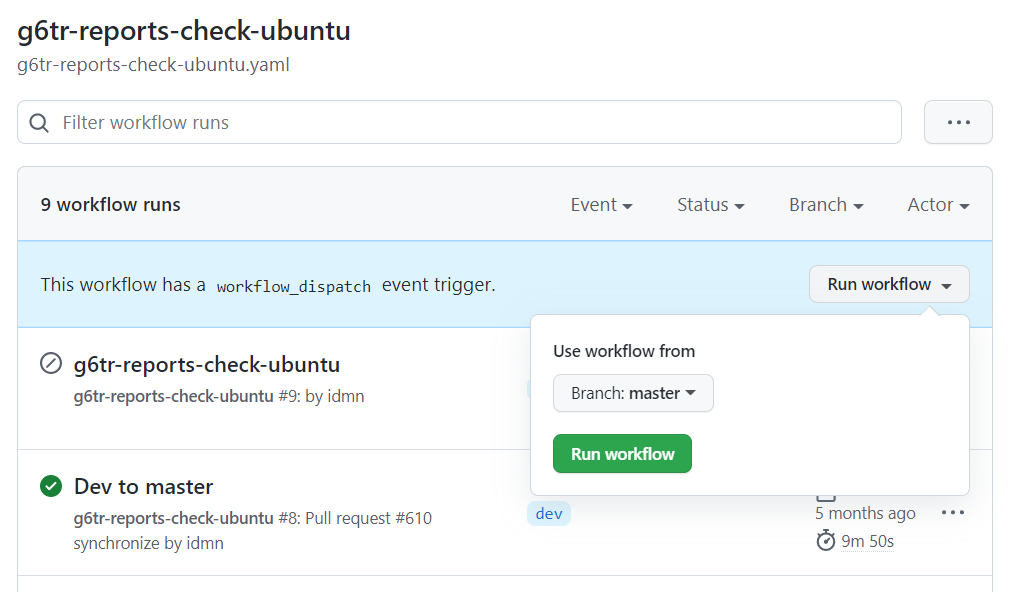
In addition we have the possibility to launch actions manually. To do this, navigate to Actions tab on GitHub and select the workflow you need from the list on the left. Then click the “Run workflow” button, select a branch and click run.
Sometimes you may need to update the workflow for a package if it suddenly
stopped working. Or you may even need to create a workflow for a new package. It
is quite likely that the
template workflow
will work just fine. If you are creating a new package with
g6tr::g6tr_package_setup() function, it will take this template automatically
replacing placeholders with package names where needed. But you may still need
to do some adjustments.
First of all, it is highly recommended to at least be aware of the basics of how it works before applying any adjustments. GitHub has good tutorials on Actions. Here’s a quick start guide and a chapter on basics and core concepts.
Now, we’ll discuss details. Let’s start from the beginning. At the top of a workflow file you’ll see these lines.
on:
  push:
    branches: [master]
    paths: packages/package_name/**
  pull_request:
    branches: [master]
    paths: packages/package_name/**
    types: [opened, reopened, synchronize, ready_for_review]
  workflow_dispatch:
This is how we define when our workflow is going to be triggered. For any
changes to the package code (paths: packages/package_name/**), automatic
triggers apply to both PRs and pushes to the master branch. Additionally, the
workflow_dispatch field provides the option for manual triggering when
necessary.
Next we define the configuration of a system where we want to run our workflow.
jobs:
  g6tr-check:
    runs-on: ${{ matrix.config.os }}

    name: ${{ matrix.config.os }} (${{ matrix.config.r }})

    if: github.event.pull_request.draft == false

    strategy:
      fail-fast: false
      matrix:
        config:
          - {os: ubuntu-latest, r: 'release'}
The if: line works as a filter. It prevents the workflow from running on draft
PRs.
    env:
      R_REMOTES_NO_ERRORS_FROM_WARNINGS: true
      R_REMOTES_UPGRADE: "never"
      GITHUB_PAT: ${{ secrets.GH_PAT }}
      UserAgent: ${{ secrets.UserAgent }}
      HTTPUserAgent: ${{ secrets.UserAgent }}
      _R_CHECK_FORCE_SUGGESTS_: false
Here we define environment variables. This is what R in the machine running the
workflow will be able to get via Sys.getenv(). secrets is for
Github secrects (link
may not be available to non-admins). This is a safe way to store logins,
passwords and secret tokens on GitHub. GitHub workflow can write these
keys to its environment variables and use them internally. For instance, we need
UserAgent to be able to install our packages from our internal CRAN.
Also you can see environment variables like R_REMOTES_NO_ERRORS_FROM_WARNINGS
and R_REMOTES_UPGRADE. These are not secrets – you can see their values.
These two, in particular, are global settings for the remotes package. This is
the package we use to install problematic package dependencies. More on this
further.
The last chunk, steps. This is the instruction on what the workflow should install and execute.
    steps:
      - uses: actions/checkout@v2

      - uses: r-lib/actions/setup-r@master
        with:
          r-version: ${{ matrix.config.r }}

      - uses: r-lib/actions/setup-pandoc@master

      - name: Preconfiguration for installations
        run: |
          install.packages("remotes")
          remotes::install_cran("rcmdcheck")
          remotes::install_github("r-hub/sysreqs")
        shell: Rscript {0}

      - name: Install linux system dependencies with sysreqs
        if: runner.os == 'Linux'
        env:
          RHUB_PLATFORM: linux-x86_64-ubuntu-gcc
        run: |
          sysreqs=$(Rscript -e "cat(sysreqs::sysreq_commands('packages/package_name/DESCRIPTION'))")
          echo $sysreqs
          sudo -s eval "$sysreqs"

      - name: Install dependencies for package_name
        run: |
                    remotes::install_deps(pkgdir = "packages/package_name", upgrade = "never", dependencies = TRUE)
        shell: Rscript {0}

      - name: Check package_name
        run: rcmdcheck::rcmdcheck(path = "packages/package_name", args = "--no-manual", error_on = "error", check_dir = "check")
        shell: Rscript {0}

      - name: Upload check results
        if: failure()
        uses: actions/upload-artifact@master
        with:
          name: ${{ runner.os }}-r${{ matrix.config.r }}-results
          path: check
Take a look at step called Check package_name. This is where the actual R CMD check happens. However, we need to provide instructions on how to install all
the requirements needed to perform the check, since Github container where
actions are run, comes with quite a minimal setup. In the steps above we specify
instructions; starting from R and ending with direct dependencies of the package
under consideration.
First three steps, starting with uses: are for sourcing code of other actions.
For instance, the first one sources
this configuration.
This step downloads our repository to the workflow machine. If you take a look
at the yaml you’ll see that it’s quite complicated. But this is a very regular
thing to do in workflows (we can just reuse a reliable code without reinventing
the wheel). The second and third uses steps install R and pandoc
correspondingly.
The next step is Preconfiguration for installations. First, it installs
remotes R package. We use it to install all the other R packages. We’ve chosen
to use remotes since it provides a clean and unified syntax for various
package installation tasks:
- installing a package from CRAN
- installing a specific package version
- installing a package from GitHub
- installing package dependencies without installing the package itself
- installing a package from local files
and more.
Remember that R_REMOTES_UPGRADE: "never" environment variable? This tells
remotes to never upgrade package dependencies if a newer version is available.
This is helpful when the most recent version of a dependency of our package
contains a bug. We can install the second-to-last version and tell remotes to
never upgrade such an installation if it happens that some other packages depend
on it as well.
Specifically, we have this kind of problem with Rttf2pt1 package. Although by
the time you are reading this, it may have been solved. Version 1.3.9 contains
a bug, so we’ve made our package g6tr.theme which depends on this package to
require specifically version 1.3.8.
After installing remotes, we install:
rcmdcheckto runR CMD checksysreqsto install Linux system dependencies of our package. Often this is unnecessary and Linux packages are installed automatically during R package installation. But in some cases it’s not that easy.
The next step, Install linux system dependencies with sysreqs is where we
(obviously) use sysreqs.
In the next step, “Install dependencies for package_name” we deal with R
dependencies of our package. If you are lucky remotes::install_deps works just
well. But sometimes it requires more effort. For a reference, take a look at the
g6tr.theme workflow file.
The last step, after the R CMD check, is for storing logs in the case if the
check failed.