Project Closeout Workflow
A step-by-step guide for closing out completed projects.
There are three Project Closeout issue types in Jira–one for Research Manager tasks, one for Code tasks, and one for Operations tasks. These should be assigned and include Smart Checklists to outline the tasks each role should complete, detailed below.
Throughout a project’s lifecycle, any contractor effort tracking issues for the client project in Jira should be marked as Done by the Project Manager as the issues/tasks were being completed. Double check to make sure no Contractor issues are still open.
Process:
- Project Lead confirms that all Contractor assigned issues have been resolved.
- Confirm actual story points are accurate.
The first step to wrapping up any client project is a debrief. This could be twofold:
Internal team debrief to confirm that everything is completed. Debrief directly with the client to confirm that everything that was promised by Gradient has been completed.
Materials resulting from the debrief step are TBD.
It is important that all past client project deliverables are stored properly. They need to be searchable (as reference materials for other projects) and easily accessible. Our Repository plays an important role in clearly housing all project materials so we can identify the final deliverables, etc.
Process:
- Project Lead to add materials to the Repository.
- Project Lead with go through the client project folder on Drive and make sure all deliverables are filed correctly.
- Clean up the folder, removing any unused deliverables or materials that are not necessary for the finalization of the project.
This step is optional and based on the MSAs and DPAs. The contracts between Gradient and the client will expressly state if Gradient is required to retain or remove/delete data that relates to the client and what kind of data must be deleted, usually within a specific timeline.
Process:
- If it is already clear to the Project Lead or Head of Research what data deletion parameters exist within the contact, they should note the provisions in the comments of the issues. If not clear, assign to Operations Team who will do an MSA/DPA review and set out the parameters in the issue.
- Issue is assigned to Gradient employee who is best suited to delete data from specific platforms:
- AWS
- Crunch
- Drive
- Forsta
- Personal computers
- Other platforms as necessary
- Complete deletion in each platform
- Each employee who deletes any information will confirm deletion of data in the issue comments to have a written record of what was deleted and when.
If this step did not happen organically during the Client Debrief step, this step is a reminder to request either a testimonial or referral from the client. Which of those two may be dependent on the hiring contracts between Gradient and the client. If their MSA clearly states that we are not to disclose or use their company name in any promotional material, we will ask for a referral. If there is no such stipulation, we should ask for a testimonial to use on our website and other sales or promotional materials.
This step can be completed by either the Project Lead or Management. Assign the issue appropriately.
Contractors are paid through Remote.com or Justworks. If there were new contractors assigned to this project, they should have been added to the system upon hiring.
Process:
- Confirm that the contractor(s) assigned to the project submitted their time correctly and the invoice payments are completed
- Confirm that the contractor’s hours have been captured as Actual Story Points in the Jira issue, as well as costs added to the Post Mortem.
As outlined in the billing terms of our SOWs, Gradient bills clients upfront for 100% of the estimated data-related fees, and reconciles with the actual costs upon project completion. Operations closely monitors line items on all invoices to ensure clients are appropriately billed for actual costs – whether that is adding an additional line for billing higher fees, or—in rare cases—adding in a debit for costs that came in lower than their initial billing.
Operations should confirm the actual costs of these items with the Project Manager:
- Survey Data Fees (e.g. Dynata, Survey160, Statara)
- Note: Operations should remain aware of the status of a project’s survey data fees as vendor invoices are received and SOWs are cross-checked. We should always flag in real-time when a vendor invoice comes in higher than estimated, and a reconciliation line can be added to the invoice draft when this occurs so the information is ready to go in the final invoice.
- The primary action here is to confirm with the Project Manager if there are any outstanding vendor invoices we anticipate receiving–and if so, when we expect to receive it, and if we can expect the final costs to be in line with what was estimated.
- Crunch Usage
- Forsta Usage
Once all vendor billable expenses have been confirmed, a final invoice needs to be sent to the client.
Recurring issues are often used for client projects. To keep the Jira system as uncluttered as possible, and so as to not have random issues pop up after the project is completed, remove all recurring issues.
Process:
- Project Lead goes to Project Page
- Select recurring issues
- Delete any recurring issues
At the conclusion of a project, all Releases under that project should have completely green progress bars.
Process:
- Go into the Releases section of the project
- Confirm the Progress of all releases is green
- Click the Release button to the right on all releases
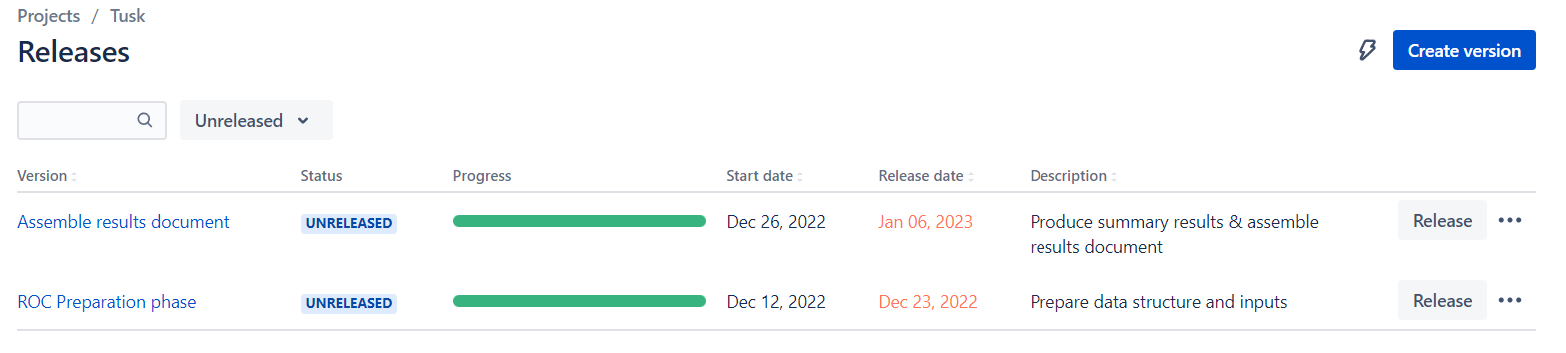
- If there are any outstanding issues assigned to the release, make sure those are properly resolved before releasing
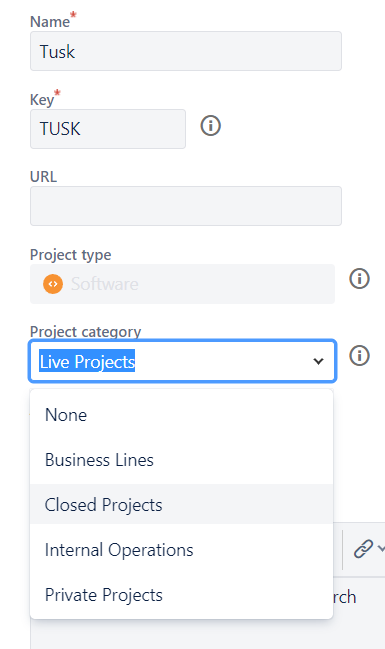
It is important that this step is completed for any reporting and for BI Metrics purposes.
Process:
- Go to the project page
- Select Project Settings > Details
- Under “Project category” use the dropdown and select “Closed Projects”
- Click “Save details”
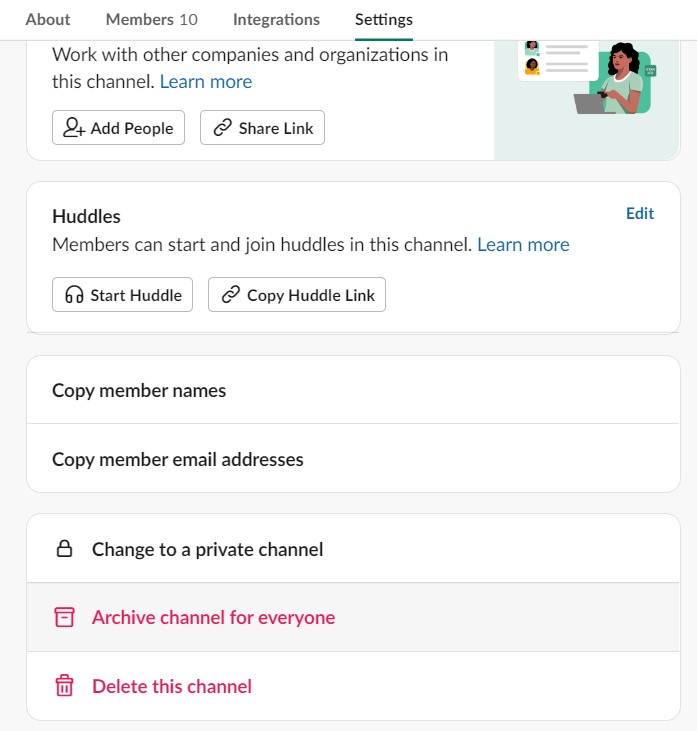
Every client project has a dedicated Slack channel created during the Project Startup. The important thing to remember when closing out project channels is DO NOT DELETE the channel, ARCHIVE it.
Process:
- Assign issue to Channel Manager or Operations
- Archive channel
Once the project has been completed (aka, when the final invoice has been sent upon synthesis delivery), Operations will hold a Post Mortem with the project team. This time will be used to review important project elements such as:
- BI Metrics: Financial, profitability, and planning metrics
- Deliverable success
- Performance of tools and resources
- Communication
- Programming learnings
- Any Kaizen submissions related to the project will also be reviewed during this time
Action items resulting from these conversations will be tracked and created as Jira issues by Operations.
- Split up analysis scripts to make it easy to follow
- Make each script self-contained, so it works in isolation
- Save intermediate data (e.g.,
srv_main) on S3 - Save models on S3
- Snapshot your project with
renv::snapshot()to make sure the latest libraries are being captured - Delete unnecessary files and make your git directory clean
- If someone new were to read this document, they should know what the code tries to accomplish.
- Fill out the main RMD file with project specifics and details
- Add headers to each section in the markdown scripts
- Mark PR Ready for review and assign reviewer
- Fix all errors that the automated builds catch if you made changes to functions in the packages
- Review PR & Merge