Working with R APIs
REST APIs and Plumber on R Views.
This is where you can learn how to create R APIs.
Here’s the
guide. Use the most recent gradient ami ... image.
On your local machine open terminal and run these commands:
ssh -i 20170822.pem ubuntu@{Public IPv4 DNS}
# example
# ssh -i 20170822.pem ubuntu@ec2-3-222-211-231.compute-1.amazonaws.com
You may encounter a message which looks like this:
@@@@@@@@@@@@@@@@@@@@@@@@@@@@@@@@@@@@@@@@@@@@@@@@@@@@@@@@@@@
@         WARNING: UNPROTECTED PRIVATE KEY FILE!          @
@@@@@@@@@@@@@@@@@@@@@@@@@@@@@@@@@@@@@@@@@@@@@@@@@@@@@@@@@@@
Permissions 0664 for '20170822.pem' are too open.
to fix it, give this file more restricting access permissions:
chmod 400 20170822.pem
In our usual AMI setup rstudio uses port 80. This is the default port, which
means that to open rstudio in a web browser, it’s enough to specify only the
machine’s IP omitting the port name. However in this particular case to
facilitate access to API we will host API on port 80 and rstudio on port 2000.
To do this you’ll need to change 80 -> 2000 in file
/etc/nginx/sites-enabled/RStudioAMI.conf.
map $http_upgrade $connection_upgrade {
  default upgrade;
  ''      close;
}

server {
  listen 80 default_server;
  index index.html;
  root /var/www;
  include /etc/nginx/RStudioAMI/*.conf;
}
… and restart nginx.
Here’s a bash script to do this (execute it through ssh)
sudo -s
new_port="2000"
sed -i -- "s/listen [0-9]*/listen ${new_port}/g" /etc/nginx/sites-enabled/RStudioAMI.conf
# check that it worked
cat /etc/nginx/sites-enabled/RStudioAMI.conf
# restart nginx to use the updated configuration
nginx -s reload
Here’s the
guide. It is in
Network & Security panel on the left sidebar panel of EC2 console. Assign a
stable/constant IP address to the instance so that each time you turn it off and
on it keeps the same IP address. 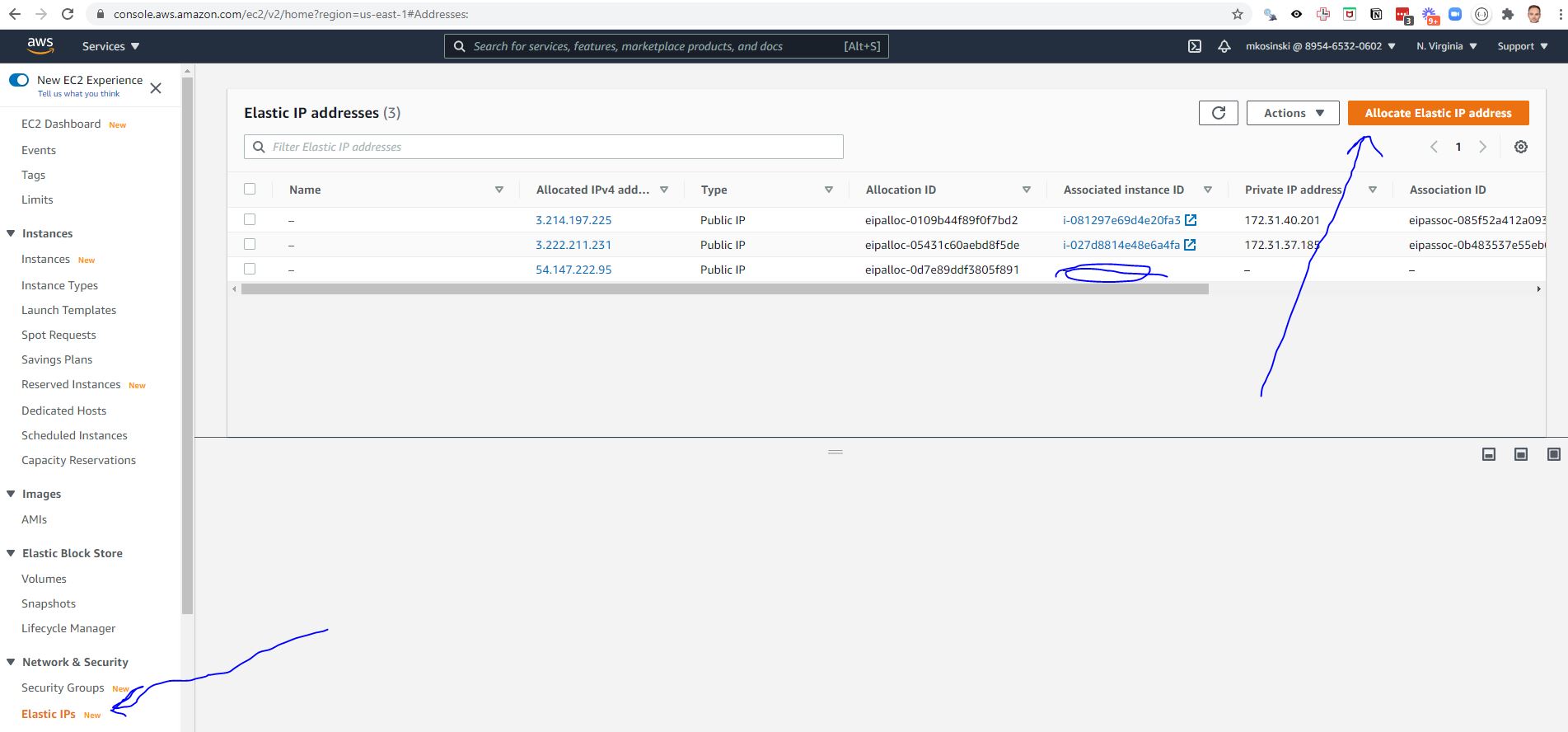
Now this is a bit clumsy (hopefully will be fixed at some point). Go to
InstanceIP:2000/auth-sign-in in browser to open the sign-in page. Once you’ve
signed in, you will be redirected to InstanceIP, i.e. is to the default port
80. The problem is that RStudio no longer listens on this port, so next you need
to manually append :2000 to the URL and open InstanceIP:2000.
To start with something, you can open RStudio project at tools/plumber/ (click
the .Rproj file). There you’ll find a set of toy API functions copied from the
plumber webpage - plumber.R and a script to launch the API: plumber_run.R.
library(plumber)
options(httr_oob_default = TRUE)

pr("plumber.R") %>%
  pr_run(port = 7000, host = '0.0.0.0')
For ports like 2000 or 7000 - it’s easy, you just set the right value to the
port parameter and launch the code. However port numbers smaller than 1025 (80
in particular) require root privileges. So to launch the API at port 80 we will
need to launch the plumber_run.R not in the usual way but through terminal
with sudo. Here’s the full command: sudo Rscript plumber_run.R.
This way of launching the API however brings in additional issues you’ll need to fix. The first one is that package library paths may not be initialized correctly. To fix it, you’ll need to manually set in your script like this:
if (!interactive()) .libPaths("/home/rstudio/R/x86_64-pc-linux-gnu-library/4.1")
Note that the actual library path may be different in your case. To get this
path, call .libPath() in console.
The second issue is that when you stop an API launched like this via Rscript,
the port (80) is not freed up automatically as it would happen normally. You need
to free it up manually. Here’s the terminal command:
sudo fuser -n tcp -k 80
If everything worked well you should be able to access the API at InstanceIP.
Try for example InstanceIP/plot.
By default pr_run() will also launch visual documentation
(
swagger) which should pop up in a new
window. If it doesn’t happen, you still should be able to find it at
InstanceIP:port/__docs__/ (or InstanceIP/__docs__/ if port = 80). To turn
off visual documentation, set docs = FALSE in pr_run().
This example shows how to host a Typing Tool as an API, which can be called by Qualtrics as a Web Service. The Web Service is provided as an API hosted on AWS cloud as a virtual instance.
This is the script that loads all the libraries and needed data.
#install.packages('plumber')
#install.packages('xml2')
#install.packages("aws.s3", repos = c(getOption('repos'), "cloudyr" = "http://cloudyr.github.io/drat"))
#install.packages('dplyr')
readRenviron('../')
library(xml2)
library(aws.s3)
library(plumber)
library(dplyr)
immigration_tt_yml <- yaml::read_yaml('atheneum/archive/immigration_typing_tool')
immigration_model <-
s3readRDS(
object = immigration_tt_yml$object,
bucket = immigration_tt_yml$bucket
)
This is the script where the application is created with all parameters and endpoints specified. This is very straightforward. See example below. Make sure your API returns a NAMED list so that it can be captured as embedded data with a specific name.
# plumber.R
#* Echo back the input
#* Return the prediction
#* @param t1
#* @param t2
#* @param t3
#* @param t4
#* @param t5
#* @param t6
#* @param t7
#* @param t8
#* @get /predict
function(t1, t2, t3, t4, t5, t6, t7, t8){
library(dplyr)
prepare_data <- function(t1, t2, t3, t4, t5, t6, t7, t8){
data <-
data.frame(
seg_bat_5 = t1,
seg_bat_6 = t2,
seg_bat_7 = t3,
seg_bat_8 = t4,
seg_bat_11 = t5,
seg_bat_13 = t6,
seg_bat_14 = t7,
seg_bat_15 = t8
) %>%
mutate(seg_bat_1 = seg_bat_5,
seg_bat_2 = seg_bat_5,
seg_bat_3 = seg_bat_5,
seg_bat_4 = seg_bat_5,
seg_bat_9 = seg_bat_5,
seg_bat_10 = seg_bat_5,
seg_bat_12 = seg_bat_5,
seg_bat_16 = seg_bat_5) %>%
mutate_at(vars(seg_bat_1:seg_bat_16), as.factor)
}
data <- prepare_data(t1, t2, t3, t4, t5, t6, t7, t8)
prediction <- predict(immigration_model, data, type = "class")
return(list(segment=prediction))
}
#* Sample
#* from a range
#* @param N
#* @param n
#* @get /sample
function(N, n){
sample(1:N, size = n, replace = FALSE)
}
This script should load the setup script, load the application script and run the application.
source("plumber_setup.R")
r <- plumb("plumber.R")
# options(httr_oob_default = TRUE)
r$run(port=7000, host = '0.0.0.0', swagger = FALSE)This is required for logs storage.
# entrypoint.R
library(plumber)
# logging
if(!requireNamespace('logger')) {
  install.packages('logger')
}
library(logger)
# Specify how logs are written
log_dir <- "logs"
if (!fs::dir_exists(log_dir)) fs::dir_create(log_dir)
log_appender(appender_tee(tempfile("plumber_", log_dir, ".log")))This is the script that loads all the libraries and needed data.
if(!requireNamespace('plumber')) {
  # system('sudo apt-get install libsodium-dev')
  install.packages('plumber')
}
if(!requireNamespace('logger')) {
  install.packages('logger')
}
if(!requireNamespace('dplyr')) {
  install.packages('dplyr')
}
if(!requireNamespace('readr')) {
  install.packages('readr')
}
if(!requireNamespace('tictoc')) {
  install.packages('tictoc')
}
library(plumber)
library(dplyr)
library(readr)
library(textclean)
if(interactive()){
  instructors_path <- "tools/plumber/chalk/2021-07-08_p7_chalk_instructors.csv"
} else {
  instructors_path <- "home/mkosinski/tools/plumber/chalk/2021-07-08_p7_chalk_instructors.csv"
}
chalk_instructors <-
  read_csv(instructors_path) %>%
  select(category = `Our Category`, instructor = `Instructor`, subject = `Topic`) %>%
  mutate(
    category =
     case_when(
       category == "Arts & Entertainment" ~	"A",
       category == "Business" ~	"B",
       category == "Design & Style" ~	"C",
       category == "Food" ~	"D",
       category == "Music" ~ "E",
       category == "Writing" ~ "F"
     )
  ) %>%
  mutate(instructor = iconv(instructor, from = "UTF-8", to = "ASCII", sub = '')) %>%
  mutate(
    instructor =
      ifelse(grepl('Alaina', instructor),
             "Alaina Urquhart and Ashleigh \'Ash\' Kelley from Morbid: A True Crime Story",
             instructor)
)# plumber.R
#* Instructors for CHALK
#* @param cat
#* @get /p7chalk
function(cat){
list(
instructors =
chalk_instructors %>%
filter(category == cat) %>%
pull(instructor) %>%
paste0(collapse = "XXX"),
subjects =
chalk_instructors %>%
filter(category == cat) %>%
pull(subject) %>%
paste0(collapse = "XXX")
)
}if(interactive()){
plumber_path <- "tools/plumber/chalk/plumber.R"
} else {
plumber_path <- "home/mkosinski/tools/plumber/chalk/plumber.R"
}
r <- plumb(plumber_path)
options(httr_oob_default = TRUE)
convert_empty <- function(string) {
if (string == "") {
"-"
} else {
string
}
}
r$registerHooks(
list(
preroute = function() {
# Start timer for log info
tictoc::tic()
},
postroute = function(req, res) {
end <- tictoc::toc(quiet = TRUE)
# Log details about the request and the response
log_info('{convert_empty(req$REMOTE_ADDR)} "{convert_empty(req$HTTP_USER_AGENT)}" {convert_empty(req$HTTP_HOST)} {convert_empty(req$REQUEST_METHOD)} {convert_empty(req$PATH_INFO)} {convert_empty(res$status)} {round(end$toc - end$tic, digits = getOption("digits", 5))}')
}
)
)
r$run(port=7000, host = '0.0.0.0', swagger = FALSE)- Use Web Service part in the survey flow
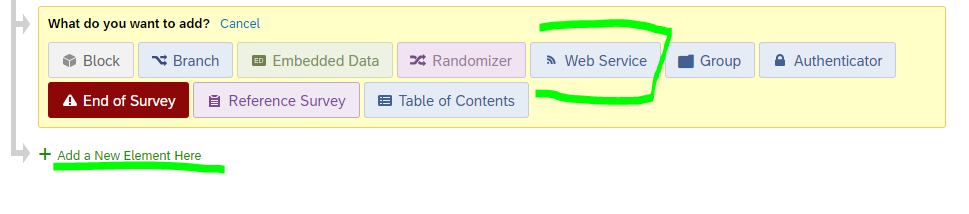
- Connect to the API

- Set parameters
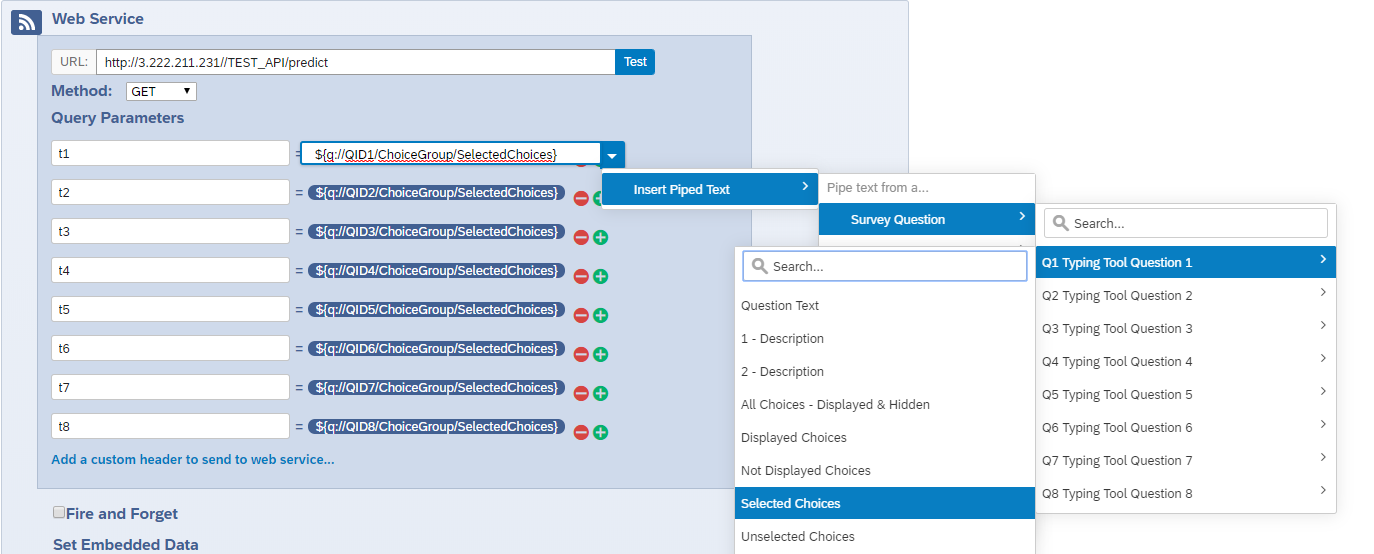
- Set the result of the API call as an embedded data
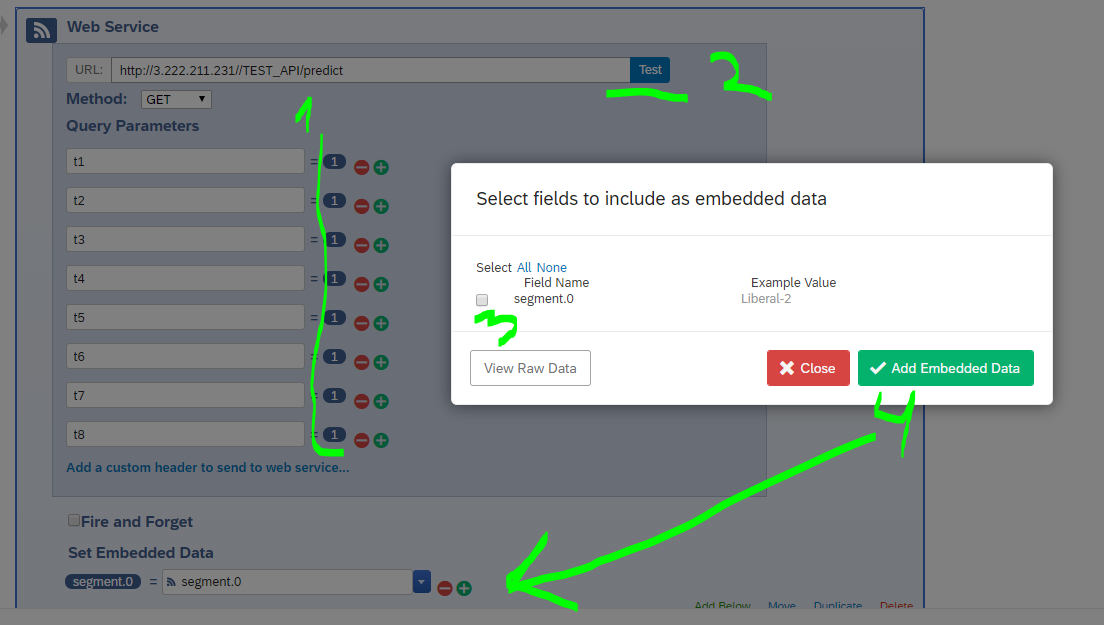
- Hit save workflow
Once the machine is restarted you’d need to launch the API server
ssh -i 20170822.pem ubuntu@Public IPv4 DNS
sudo docker-compose up -d
# example
# ssh -i 20170822.pem ubuntu@ec2-3-222-211-231.compute-1.amazonaws.com
# sudo docker-compose up -d
and then start the plumber R API from RStudio Server again.
If you did not specify the elastic IP address then please make sure you setup new IP address when you call the API with the new IP address of the machine
If you ever need to provide a monitoring for the API that would restart the API if it crushes then follow this script for which the explanation is below.
# this is your own function that you create to check whether API you setup
# returns code 200 on all it's endpoints
status_check <- function(){
  status_codes <- list()
  for(i in LETTERS[1:6]) {
    status_codes[[i]] <- GET(str_c('http://54.147.222.95//HOUSE/p7chalk?cat=', i ))$status_code
  }
  all(unlist(status_codes) == 200)
}
# you can create your own text pasted to #api_monitoring Slack chanel
success_message <- 'API for CHALK Qualtircs P7 survey is working fine.'
failure_message <- 'API for CHALK Qualtircs P7 survey is down! Call Marcin on WhatsUp to fix that ASAP!'
# the last parameters you setup are
# instance that hosts the API
# and the script to be run to restart the API once it's down
instance_ip <- '54.147.222.95'
script <- 'home/mkosinski/tools/plumber/chalk/999_restart.R'
Pay attention to the working directory on the machine that will launch the restart script
# load needed libraries
library(rstudioapi)
library(httr)
library(stringr)
library(ssh)
library(aws.ec2)
library(purrr)
library(stringr)
# setup few functions, co that code is cleaner
# below is the code for posting a message on slack
post_message <- function(message) {
httr::POST(
url = 'https://hooks.slack.com/services/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',
httr::add_headers(`Content-type` = 'application/json'),
encode = "json",
body = list(text = message)
)
}
# there is one more that will get the pem file from S3
get_pem_file <- function() {
pemfile_raw <- aws.s3::get_object(object = 's3://monorepo-data/tests/20170822.pem', as = 'raw')
writeLines(gsub('\r\n', '\n', rawToChar(pemfile_raw), fixed = TRUE), con = 'pem.pem')
}
# this is needed to log on the machine that hosts the API# to ssh you only need to use ssh_connect that is packed with some extra checks that ensure
# the connection was made
connect_to_instance <- function(instance_ip){
possible_ssh_connect <- possibly(ssh_connect, otherwise = NA)
attempts <- 0
# connect to the machine
while(TRUE & attempts < 100) {
session <-
possible_ssh_connect(
host = paste0("ubuntu@", instance_ip),
keyfile = 'pem.pem',
passwd = Sys.getenv('AMI_PASS')
)
attempts <- attempts + 1
if (!(suppressWarnings(is.na(session)))) {
break
}
Sys.sleep(5L)
}
session
}# there is a function to restart the script on another machine
run_script <- function(script, session) {
ssh_exec_wait(session, str_c("docker exec -t ubuntu_rstudio_1 Rscript ", script))
}# and the last one that actually calls all others
restart_api <- function(instance_ip, script){
get_pem_file()
ssh_connection <- connect_to_instance(instance_ip)
if(suppressWarnings(is.na(ssh_connection))) {
post_message('Could not connect to the EC2 instance running the API.')
post_message(failure_message)
} else {
run_script(script, ssh_connection)
}
}# finally below is the script that verifies the status
good <- status_check()
# and
if(good) {
post_message(success_message)
} else {
# if something is wrong
# waits another 2 minutes
post_message('There was an issue getting data from API. Waiting 2 minutes and calling the API again.')
Sys.sleep(2*60)
good <- status_check()
if(good) {
post_message(success_message)
} else {
# and then restarts the api
post_message('API does not work. Attempting to restart it...')
restart_api(instance_ip, script)
}
}The above script is executed by a for loop
for(i in 1:1000) {
 jobRunScript('tools/plumber/monitoring/api_monitoring.R', name = i)
 Sys.sleep(15*60)
}
that starts a separate RStudio job every 15 minutes.