Outputs and Statistics
So we managed to fill all the inputs, click the calculate button, and we need to interpret the output somehow.
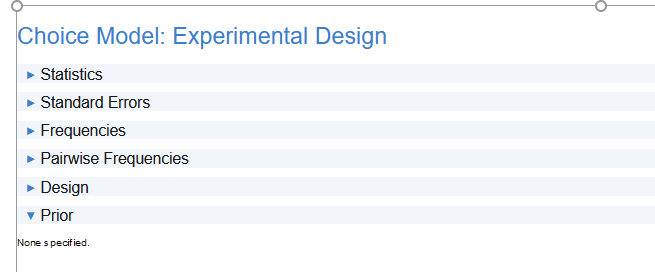
Output Preview
In the first tab, you will see a bunch of statistics. The most important for us are: D-error (we want to minimize that) and balance (there are 4 different balance fields) – we want to keep it close to 1, but we assume that anything above 0.8 for rather complicated designs is OK. In the case of D-error, there is no specific threshold. Rather, you need to compare different setups and decide which is the best. However, keep in mind that Alternative Specific designs and Partial profiles, by definition, will result in higher D-error, so comparing them with Complete Enumeration or Balanced Overlap won’t tell you much. When life shoots you with lemons, you can consider using more Questions per respondent, Number of alternatives.

Statistics
As a rule of thumb, we want to keep the standard errors as low as 0.05 or less for the main effects. There is no direct way to assess the interactions in DisplayR, but to let you know their standard errors are usually higher than main effects – 0.1 is OK. For alternative specific designs and partial profiles, we will also likely see standard errors higher than 0.05. While it is not something we would like to see, it is often impossible to get them lower due to the design nature. One thing that can help reduce standard errors without the need of sacrificing design is using a bigger sample size. Other more drastic solutions are increasing the number of alternatives or removing some levels.
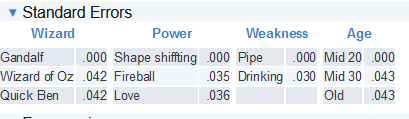
Standard Errors
What we want to see in these two tabs is more or less similar number within attribute and between attributes.
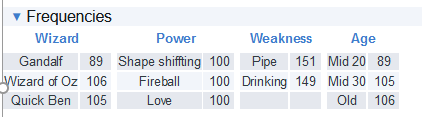
Overal Frequencies
The number of times Gandalf level is shown compared to Wizard of Oz and Quick Ben, is a little bit low. This is due to prohibitions I set for this design (Gandalf obviously cannot be in mid 20s). For other levels, they seem equally distributed within attributes.
Looking at the pairwise frequencies the above pattern becomes more obvious:
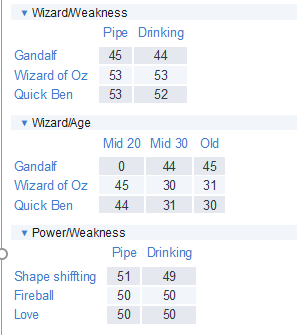
Pairwise Frequencies
Wizard x Age pairwise comparison shows exactly what we would want to see, the Gandalf and Mid20 are never shown. Since it causes Gandalf to be overall less frequent, all other pairs of Wizard will show less frequent pairs including Gandalf. This is also the reason why we should be careful about prohibitions. They produce less balanced designs, so they should be avoided when possible.
While you might have heard that overlaps are bad, that is not necessarily true. It is true that designs without (if possible of course) overlaps are better from a statistical point of view. However, real life is not statistics. Respondents very often make choices on few MUST HAVE and few MUSTN’T HAVE levels. So, anytime they need to choose between the concept containing must have level and something else, they will make the obvious choice. But unfortunately, it does not tell us anything about the rest of the attributes and their levels. Contrarily allowing overlaps means that in some of the questions, respondents will need to face more real-life situations where two or more competing products have similar properties.
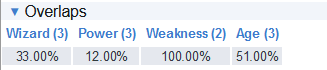
The Overlaps tab gives us information on the percent of questions for which there was at least one repeated level of attribute. E.g. if the overlap value is 50% it means that in half of the questions respondents saw at least twice the same attribute level. For the sample design we used 3 alternatives. Since we have one attribute that has only 2 levels, and also there is a prohibition, we cannot avoid the overlaps. However we will see different number of overlaps depending on the algorithm.
Here are the overlaps created with the Balanced Overlap algorithm:
Balanced Overlap Overlaps
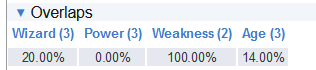
And this is what we get if we use the Complete Enumeration algorithm:
Complete Enumeriation Overlaps
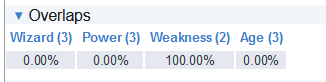
In the second case all repetition of Power levels in questions were removed. They remained however for Wizard and Age – due to prohibitions. Running the design once again, now without prohibitions indeed removes the repetitions of Wizard and Age levels:
Complete Enumeriation Without Prohibition Overlaps
There are two more tabs: Design and Priors. Design contains all the conjoint tasks and priors will contain the information on priors you provided in the inputs. Besides checking if you provided proper information (number of attributes and levels, their names, priors if present), those are not really diagnostic tabs.
Go to the Design tab, select everything and just copy-paste to excel sheet.
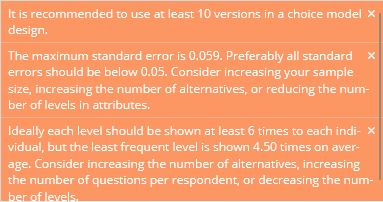
There is however one nice feature of Displayr. Anytime there might be something not optimal in your design, you will see an orange pop-ups in the upper right corner:
Warnings
They will provide you information about what might not be optimal in your design and what usually should help to solve the problem.